A UX & GEO page auditor that tells owners exactly what to change.
Paste an address. Two audits run at once: UX conversion and AI visibility. Every finding says what's wrong, why it matters and how to fix it.
Name the element. Then name the fix.
Free tools give scores and generic advice, and AI can sound certain about things it made up. So PageAudit names the exact element and the fix, grades only what it can reproduce, and says when it couldn't read a page.
"Improve your CTA."
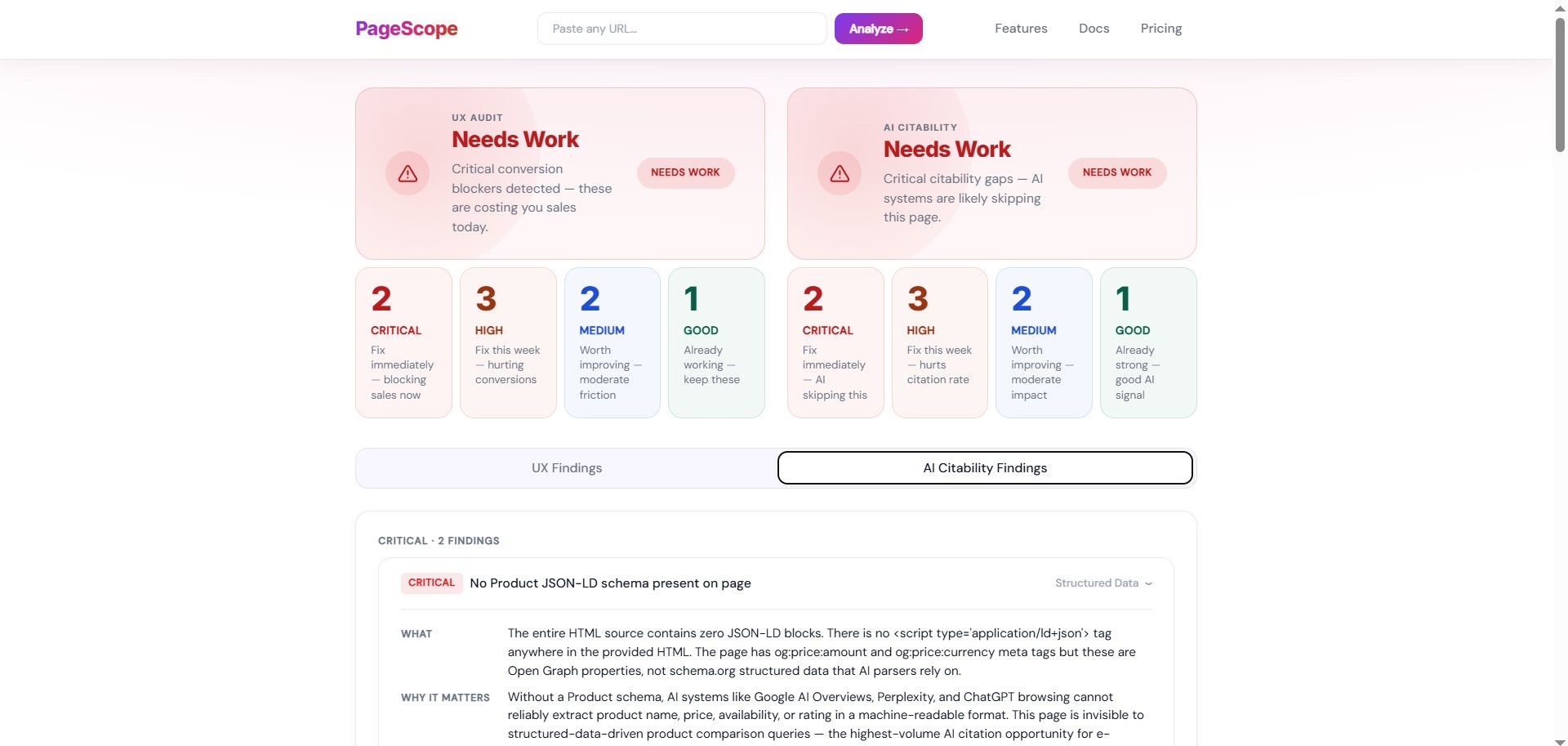
No guarantee or risk-reversal statement present
Top: the kind of advice generic tools give. Bottom: a real finding from a real audit, shortened where you see … (business anonymised).
Find the root cause. Error-proof the fix. Repeat.
I read every report as an owner would, traced each wrong finding to where it started, fixed it there, and wrote the fix down as a rule. The biggest single cause was the prompt itself.
- Build
- Test on real pages
- Find the root cause
- Error-proof the fix
- Update the standard
- Run again↺ back to 1
From grades to things you can check.
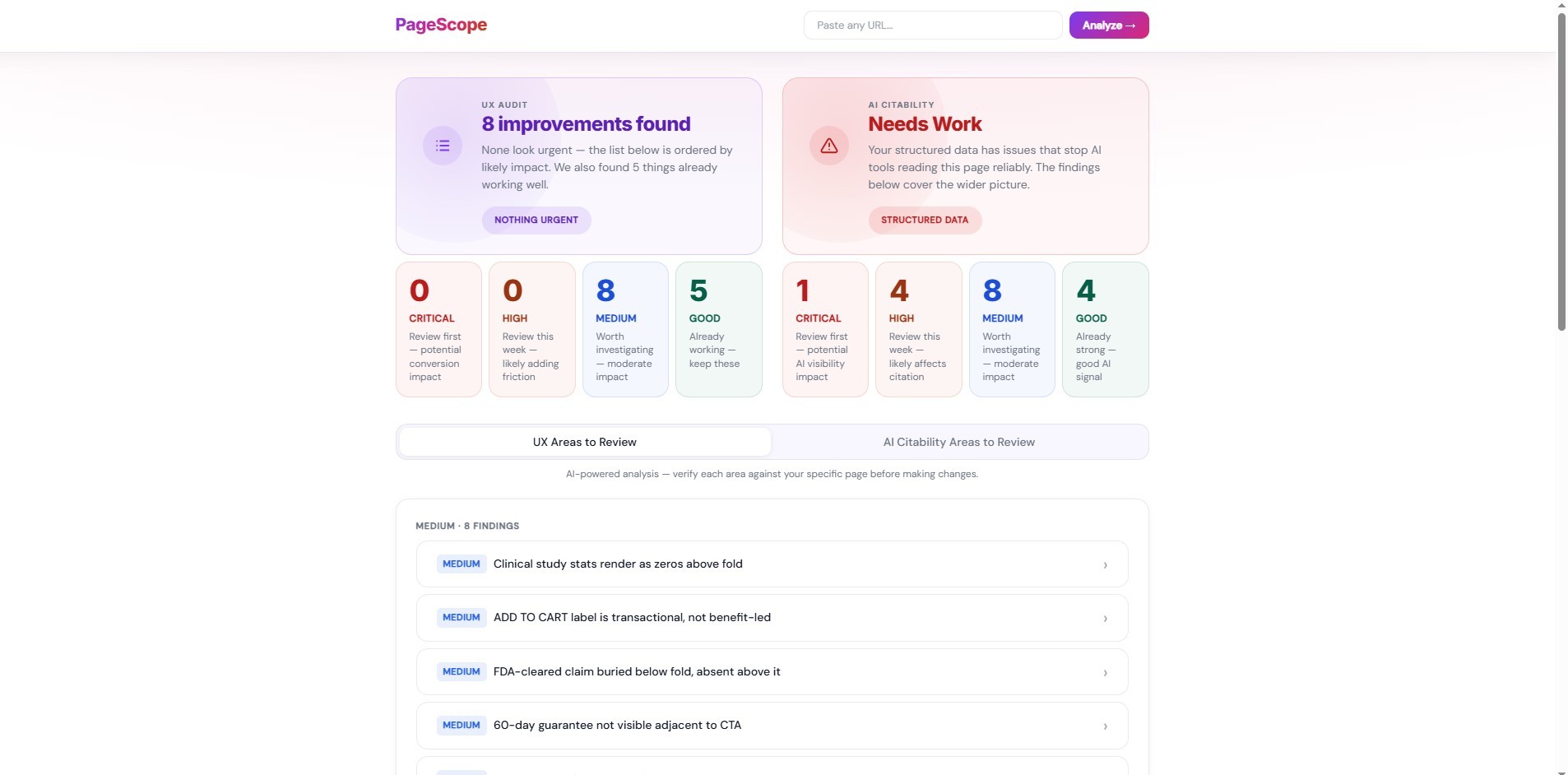
Re-running the same unchanged page gave 2 critical issues, then 2, then 1. So I removed every grade the product couldn't reproduce: structured data is graded against Google's required properties, and everything else is a plain count of findings.
Designed, built and shipped. Now it needs its first users.
Live, and checked against 6 real business sites. User sessions with owners come next.
What I learned: trust in an AI product has to be designed. Sometimes that means taking features out: the scores went, and the page generator stays off until it's good enough.
Owners need the fix,
not a score
PageAudit is for people who run a business and rely on their website: a shop, a plumber, a freelancer. A score doesn't help them. What helps is knowing which part of the page is wrong and what to change, clearly enough to pass to whoever builds the site, or to fix it themselves that afternoon.


An online shop owner. Visitors reach the product page and leave without buying, and nothing says why.
A local tradesperson. The phone should ring from the homepage, and the call button gives no reason to press it.
A self-employed professional. One service page does the selling, and they can't tell what's missing, or whether AI assistants can read it.
Owners act on what the report says. If one line is wrong, they stop trusting the rest.
Whether AI assistants recommend a business depends on its whole website and how it's talked about elsewhere. A single page is the part an owner can change today, so the AI visibility audit covers that page only, checks its structured data against Google's own rules, and says so in the report.
Four rules behind
every screen
PageAudit is an automated pipeline: it loads the page in a real browser, runs fixed checks, then asks the AI only for what the checks can't answer. It runs two audits on one page, UX conversion and AI visibility, and turns them into a single report with a PDF. Every design decision in it follows one of these rules.

Build, test on real pages,
fix the cause, repeat.
AI output looks convincing even when it's wrong, and only real pages expose it. So I ran the project as a continuous improvement loop (plan, do, check, act): test on real pages, read every report as an owner would, find the root cause, error-proof the fix, and write it down as a standard.
What I did. Two audits and a page generator, with the AI giving each page a score.
What broke. The same page came back with 2 critical issues, then 2, then 1, with nothing changed. The AI also flagged delivery information as missing when it was on the page.
If you run the audit twice and get two different scores, why would you trust either? So I stopped letting the AI score anything. And if a browser can check something, like whether the delivery info is on the page, I check it first instead of asking the AI to guess.


Honestly, the generated pages weren't good enough to show a client. Next to the audit they'd have made the audit look worse too. So I hid the generator and shipped what worked.

When I traced the wrong findings back, most of them came from what the AI was given. Its reasoning was usually fine. So fixing the input fixed a whole group of problems at once.
The AI wasn't lying on purpose. The prompt asked for a number, so it gave one. Changing what I ask for was the only fix that works on every page, including ones I'll never see.

A report is only as good as the page it read. Reaching the bottom of a page isn't the same as having all its text, and having a page isn't the same as having the right one. Decision 03 covers the second.
- Typing an address without https:// left the Run button dead, with no explanation.
- Reloading the page lost the whole report.
- A counter read "0%" to the tool and "97%" to real visitors.
- Claude API. Cost measured on every audit, about $0.18, with a daily spend cap so a busy day can't run up a bill.
- Puppeteer. A real browser loads the page, so the tool reads what a visitor sees, after the page's scripts have run.
- Railway. Chosen after comparing seven hosts on the same six questions. The deciding one: does a two-minute audit fit inside the request time limit?
- GitHub. All 16 test suites run automatically on every push, so a broken change shows up before anyone sees it.
Build, test on real pages,
fix the cause, repeat.
AI output looks convincing even when it's wrong, and only real pages expose it. So I ran the project as a continuous improvement loop (plan, do, check, act): test on real pages, read every report as an owner would, find the root cause, error-proof the fix, and write it down as a standard.
Tap a phase to see what broke and what changed.
What I did. Two audits and a page generator, with the AI giving each page a score.
What broke. The same page came back with 2 critical issues, then 2, then 1, with nothing changed. The AI also flagged delivery information as missing when it was on the page.
If you run the audit twice and get two different scores, why would you trust either? So I stopped letting the AI score anything. And if a browser can check something, like whether the delivery info is on the page, I check it first instead of asking the AI to guess.
What I did. The visual system, a URL-only entry, the results layout, and a generator meant to rewrite the page.
What broke. The generator's first runs gave a blank white page. Once fixed, the pages loaded but looked worse than the originals: a redrawn logo, a missing gallery.
Honestly, the generated pages weren't good enough to show a client. Next to the audit they'd have made the audit look worse too. So I hid the generator and shipped what worked.
What I did. Ran the same page twice, on several real business sites.
What broke. The wrong main button was detected on 4 of 4 pages, more than half of one page's text was cut without warning, and a hotel was told it had no address.
When I traced the wrong findings back, most of them came from what the AI was given. Its reasoning was usually fine. So fixing the input fixed a whole group of problems at once.
What I did. Read every full report as an owner would.
What broke. Findings carried invented percentages, because the prompt asked for them. Scores bunched in the middle of the scale.
The AI wasn't lying on purpose. The prompt asked for a number, so it gave one. Changing what I ask for was the only fix that works on every page, including ones I'll never see.
What I did. Deployed it, added the PDF report, and made the layout responsive.
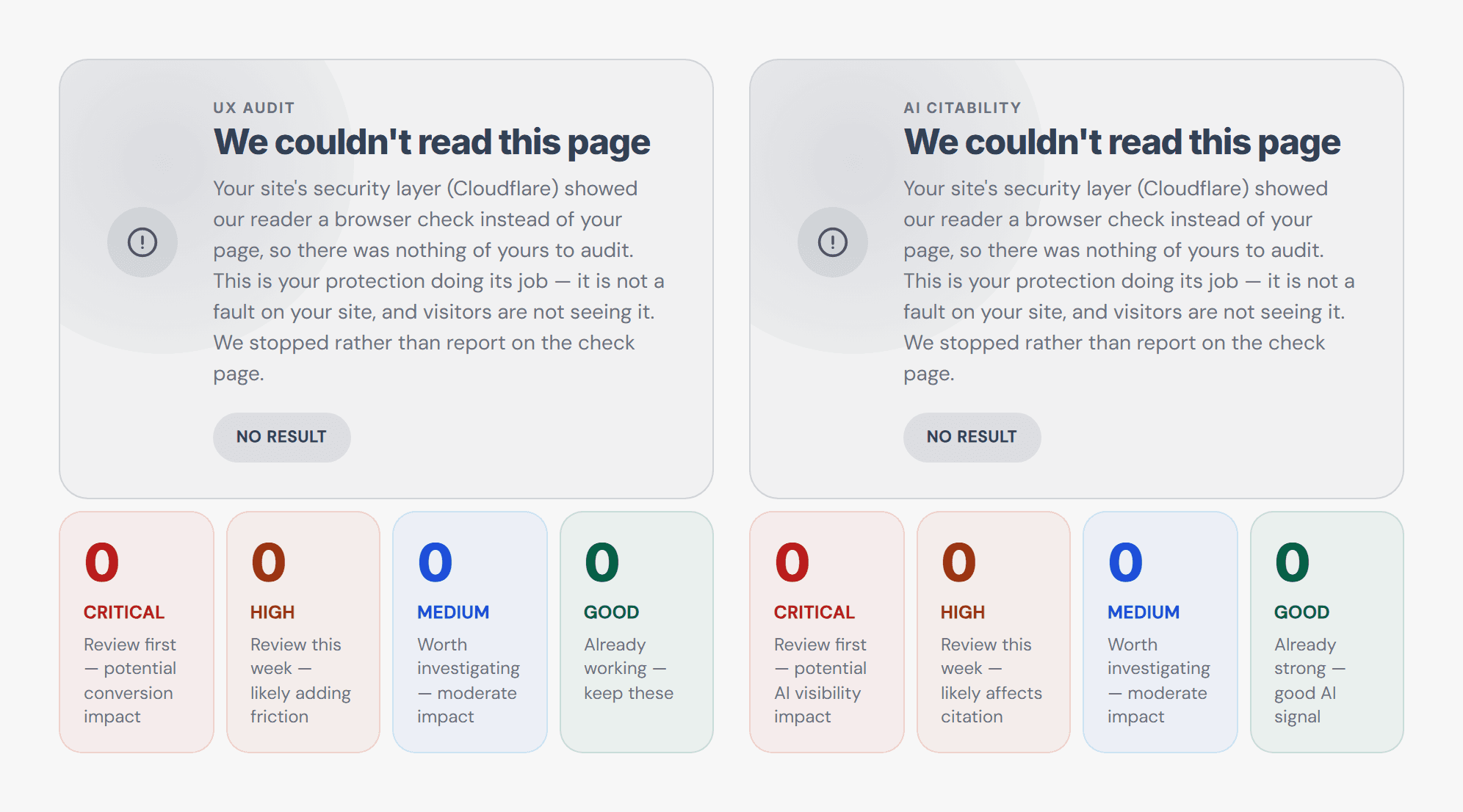
What broke. One long product page was only 61% read, and one audit described a security-check screen instead of the business's homepage.
A report is only as good as the page it read. Reaching the bottom of a page isn't the same as having all its text, and having a page isn't the same as having the right one. Decision 03 covers the second.
- Typing an address without https:// left the Run button dead, with no explanation.
- Reloading the page lost the whole report.
- A counter read "0%" to the tool and "97%" to real visitors.
- Claude API. Cost measured on every audit, about $0.18, with a daily spend cap so a busy day can't run up a bill.
- Puppeteer. A real browser loads the page, so the tool reads what a visitor sees, after the page's scripts have run.
- Railway. Chosen after comparing seven hosts on the same six questions. The deciding one: does a two-minute audit fit inside the request time limit?
- GitHub. All 16 test suites run automatically on every push, so a broken change shows up before anyone sees it.
Three calls that shaped
the product
Each one started with something going wrong. Here's what I could have done, and why I went the way I did.
From scores to words
My first design showed numbers, and they weren't stable. The same page, run again with nothing changed, came back different.
Only ask for what the evidence supports
The prompt asked the AI to judge whether AI crawlers were blocked, using information that isn't on the page. It also asked for an "expected uplift" on every finding, so the AI made one up.
"So why was the page audit built missing these crucial features?"
Me, pushing back on "one page is enough"
Is this even the right page?
Auditing a national franchise's homepage, the tool wrote eight confident pages about a security-check screen. Seven checks passed, because each one asked whether the capture worked. None asked whether it was the right page.
One design,
on screen and on paper
An owner needs something they can keep, forward and print. I built it from the page they had already seen.
Where the PDF comes from
An audit lived only in the browser tab. A reload, or an old iPhone restarting Safari, and it was gone. An owner will also want to pass it on to whoever builds their site.
The AI wrote the code,
I made the calls
Most of the code was written with Claude Code. My job was deciding what to build, and checking what came back.
How to trust fast work
AI makes building fast. It makes being wrong fast too, and a wrong answer arrives sounding exactly as sure as a right one.
Where it stands,
and what I'd keep
What the tool can't do yet, and three things the project settled for me.
Measure first, then let the AI explain
The biggest accuracy gain came from code, in a step that measures the page in a real browser before the AI sees anything: where the main button sits, what the page says about delivery, returns and reviews.
The first run with it turned a false "delivery information missing" critical into a correct "delivery information present". The model stopped guessing at things that could simply be measured.
Design intent doesn't survive as HTML
The generator was meant to hand owners an improved version of their page. It kept the structure and lost the design.
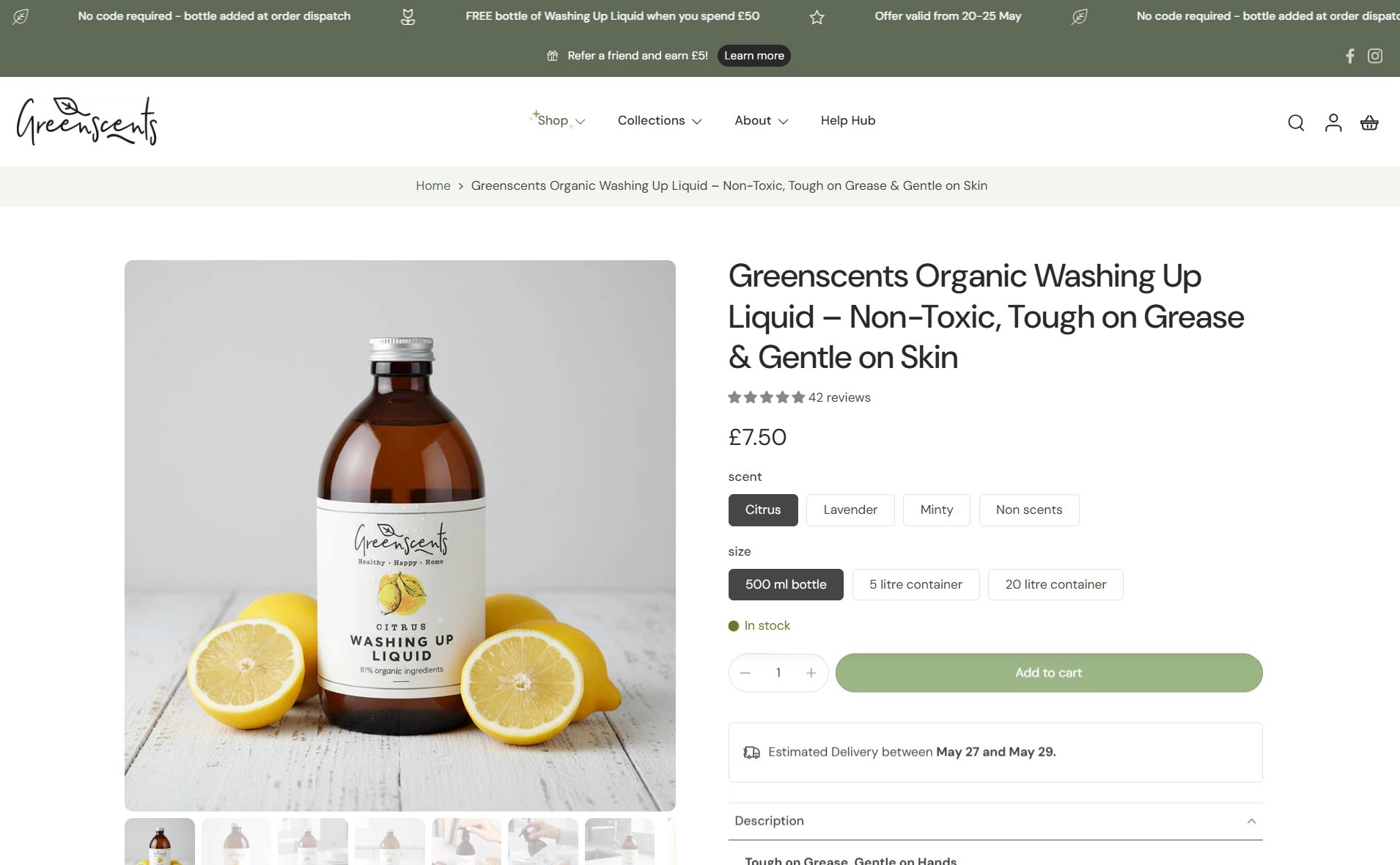
A page's spacing, type and rhythm were chosen by someone, for reasons the markup never records. Asked to improve the page while keeping its look, the AI can only guess at those reasons. On Greenscents it rebuilt the product page in a plainer style and redrew the handwritten logo as plain text.
 Original
 Generated
The product page, before and after the generator. Open full size
 Original
 Generated
The brand's handwritten logo, and the generator's redraw.
Shipping less protected the rest
The two audits promise precise findings about your page. The generator promised a better page, ready to use, and its output couldn't back that up. Released together, a redrawn logo would have undermined every accurate finding above it.
The same reasoning now keeps the full-site audit on the shelf. When the idea came up, my answer was that we still struggle to audit one page properly, so one page comes first.
What this project settled: the design work that matters most in an AI product happens before the model sees anything. Deciding what to measure, what to refuse, and what to leave out are design decisions. The prompts were the easy part.
What shipped,
and what comes next
PageAudit is live and runs real audits. The next step is putting it in front of the owners it was built for.
I built PageAudit to answer one question for a business owner: what should I change on this page? Getting that answer right, and saying so when it can't, turned out to be the whole job.