Wellbeing Assistant App
Wellbeing Assistant App
This project was part of the final assessment of a Postgraduate Studies program in UX Design. We worked in a group of five students.
I was involved in Research and UI/UX Design.
“How can we help people working from home take care of their health and quality of life?”
25% of people working remotely see maintaining a balance between work, personal life, and health as their biggest challenge. Another 24% point to a sense of loneliness.
Approximately 40% of people working remotely feel that, after switching to remote work, they are spending more time on it than they did before.
https://buffer.com/state-of-remote-work/2022
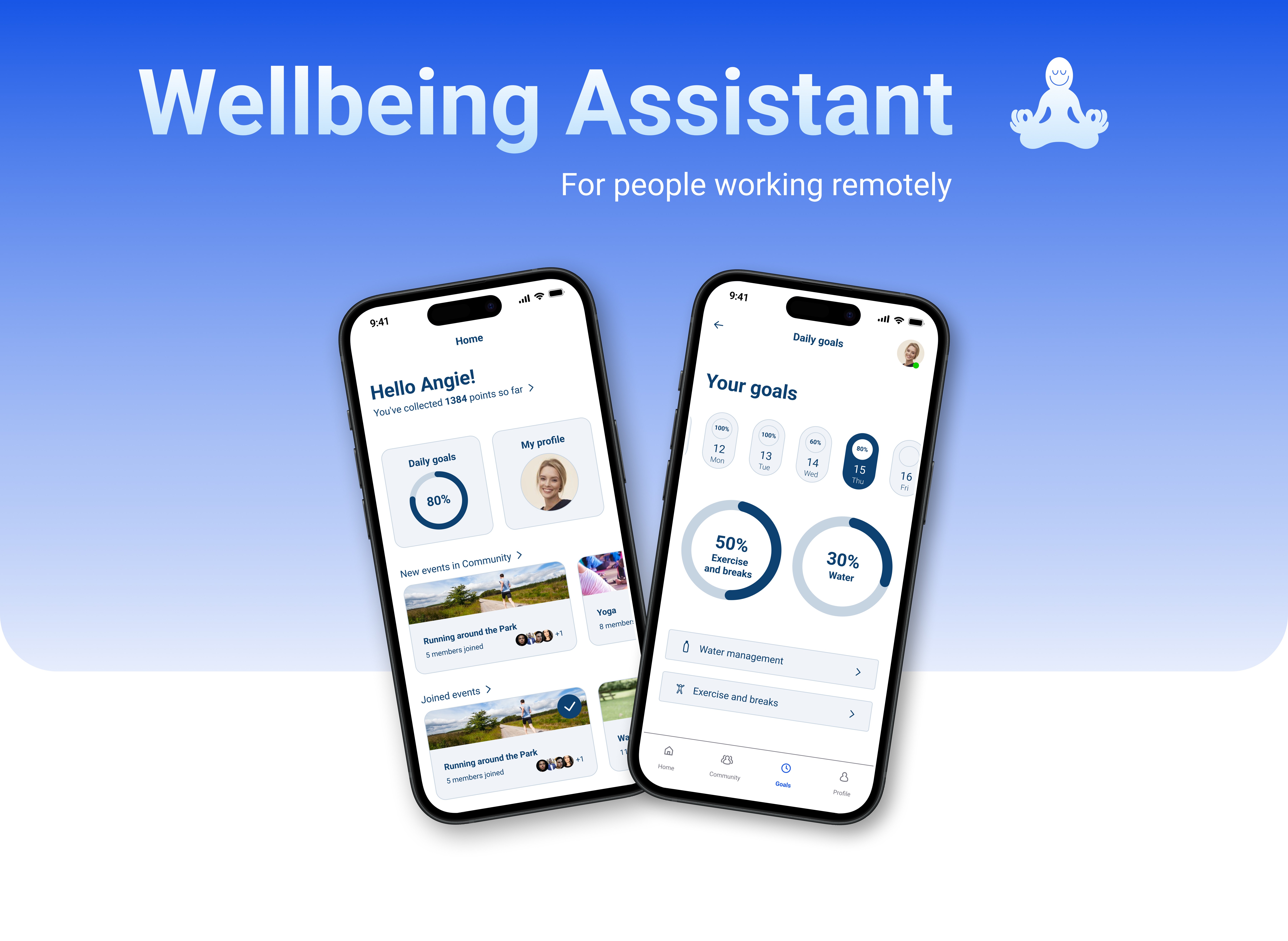
Break Exercise Notification Flow
Break Exercise Notification Flow
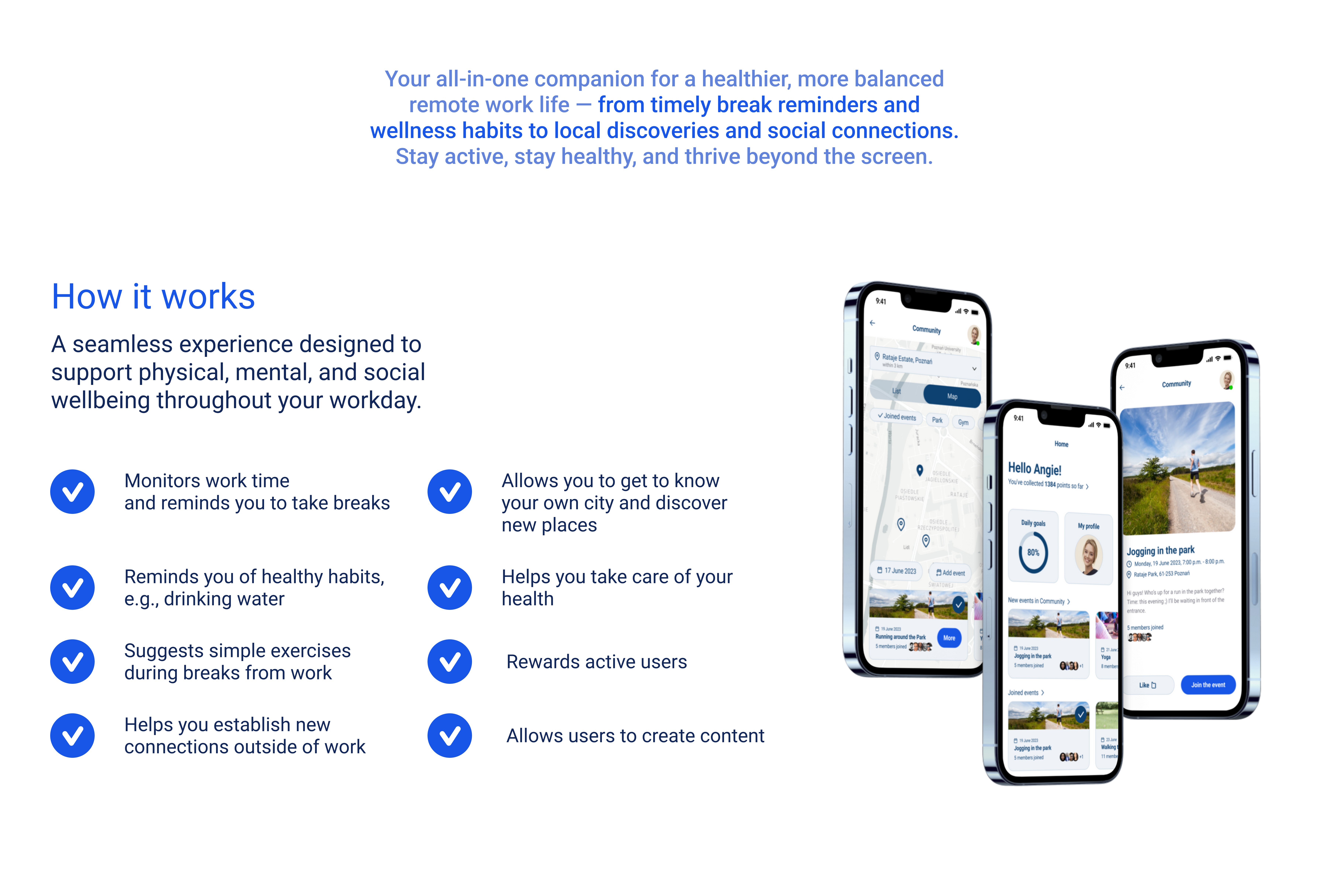
Case Study
Case Study
Case Study
Discover
Discover
Conclusions and hypotheses
Comment
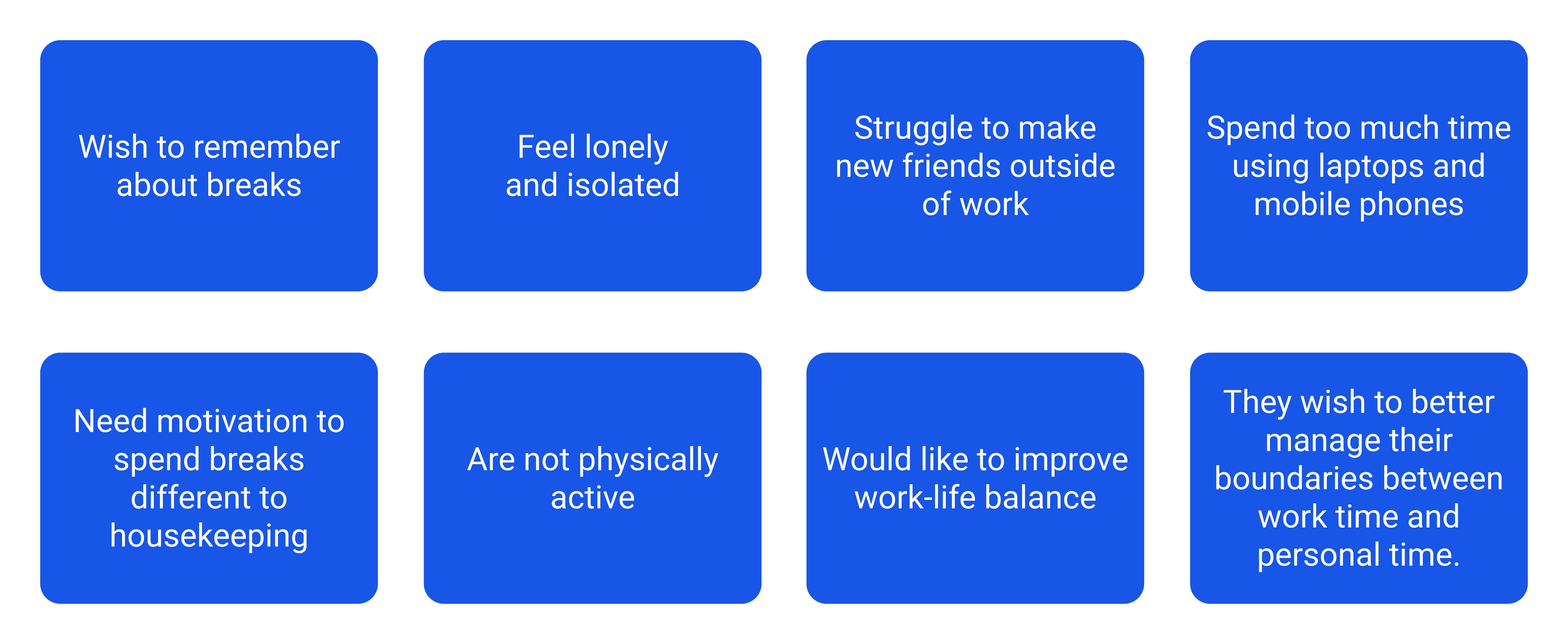
We synthesized user research into these eight core pain points to ensure the app addressed the psychological aspects of remote work, not just physical ones. This led to the decision to prioritize boundary management and social isolation as primary problems to solve, rather than just building a simple habit tracker.
Conclusions and hypotheses
Comment
We synthesized user research into these eight core pain points to ensure the app addressed the psychological aspects of remote work, not just physical ones. This led to the decision to prioritize boundary management and social isolation as primary problems to solve, rather than just building a simple habit tracker.
Analysis Competitors
Comment
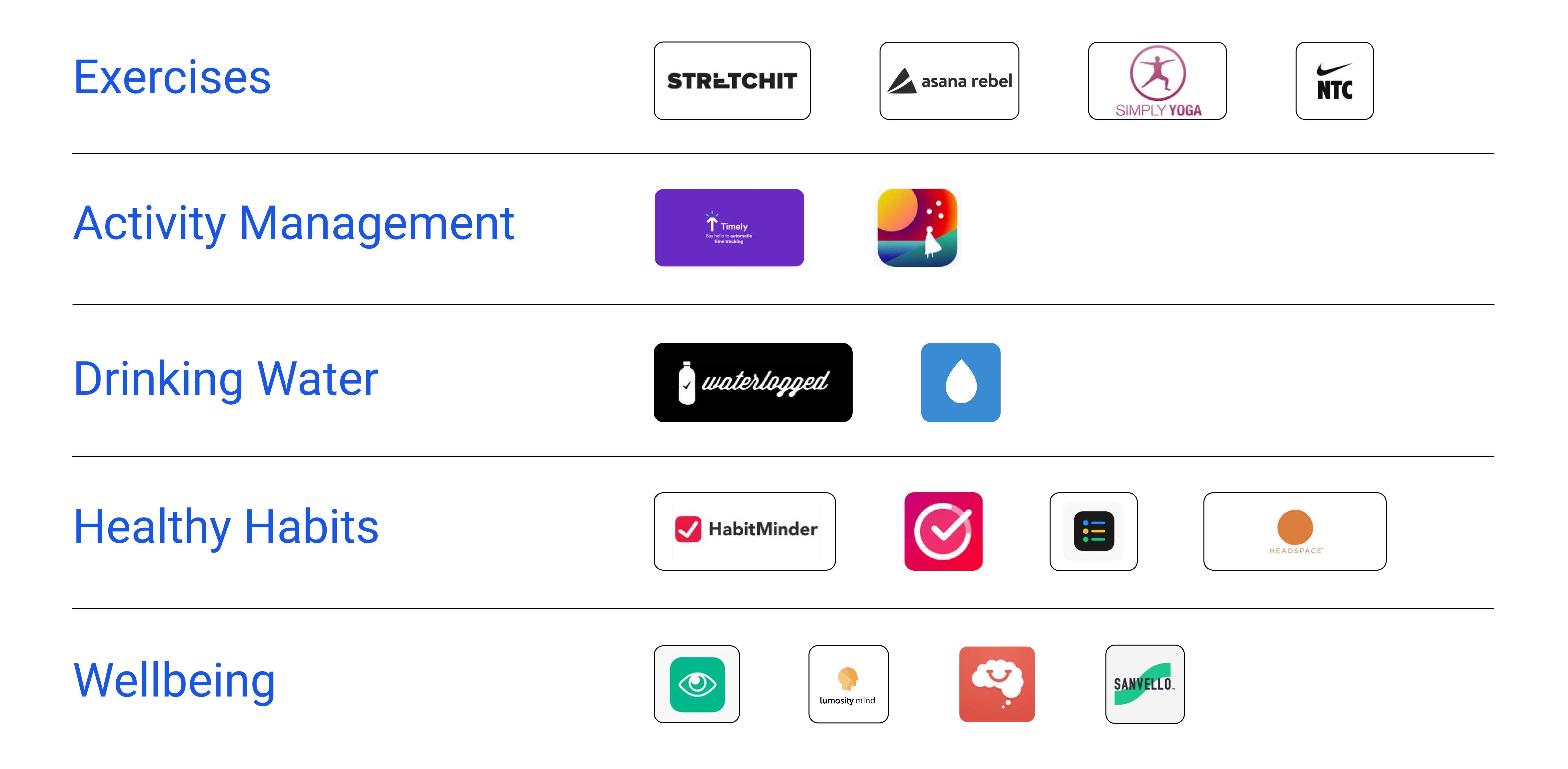
Our audit revealed that while the market is saturated with 'siloed' apps for water or yoga, there was a significant gap for a cross-functional wellbeing assistant. I decided to bridge these categories to provide a holistic solution that manages both physical health and social work-life balance in one place.
Analysis Competitors
Comment
Our audit revealed that while the market is saturated with 'siloed' apps for water or yoga, there was a significant gap for a cross-functional wellbeing assistant. I decided to bridge these categories to provide a holistic solution that manages both physical health and social work-life balance in one place.
Research & Observations
Research & Observations
2 four-hour observations
Incorrect body posture while working—often hunched, with the head positioned very close to the monitor.
Working in poor lighting.
Hydration issues: the amount of fluids consumed is too small.
Limited face-to-face interaction; numerous conversations with coworkers take place without cameras on, resulting in no direct in-person contact with others.
Breaks are primarily used for eating.
Observed attempts at stretching, but performed without specialized knowledge of the proper technique.
A headache was noted among the observed symptoms.
2 four-hour observations
Incorrect body posture while working—often hunched, with the head positioned very close to the monitor.
Working in poor lighting.
Hydration issues: the amount of fluids consumed is too small.
Limited face-to-face interaction; numerous conversations with coworkers take place without cameras on, resulting in no direct in-person contact with others.
Breaks are primarily used for eating.
Observed attempts at stretching, but performed without specialized knowledge of the proper technique.
A headache was noted among the observed symptoms.
2 four-hour observations
Incorrect body posture while working—often hunched, with the head positioned very close to the monitor.
Working in poor lighting.
Hydration issues: the amount of fluids consumed is too small.
Limited face-to-face interaction; numerous conversations with coworkers take place without cameras on, resulting in no direct in-person contact with others.
Breaks are primarily used for eating.
Observed attempts at stretching, but performed without specialized knowledge of the proper technique.
A headache was noted among the observed symptoms.
Comment
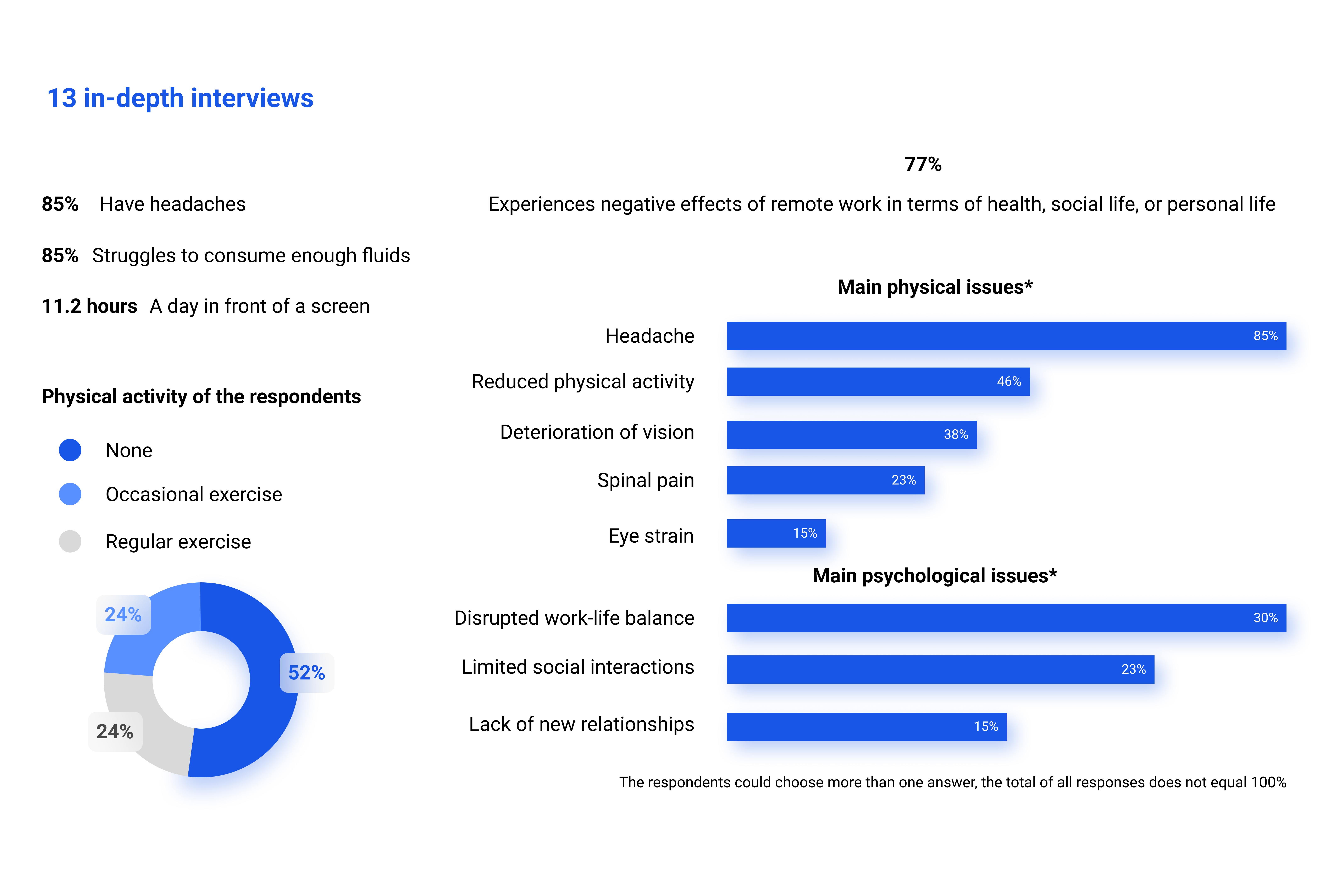
By combining qualitative deep-dive interviews with direct behavioral observations, we uncovered a significant disconnect between remote workers' intentions and their actual habits, such as improper stretching techniques and severe dehydration. These data-driven insights validated the decision to focus on guided physical interventions and automated hydration tracking, directly addressing the 85% of users suffering from headaches and screen fatigue.
Design
Design
Persona / Empathy map
Comment
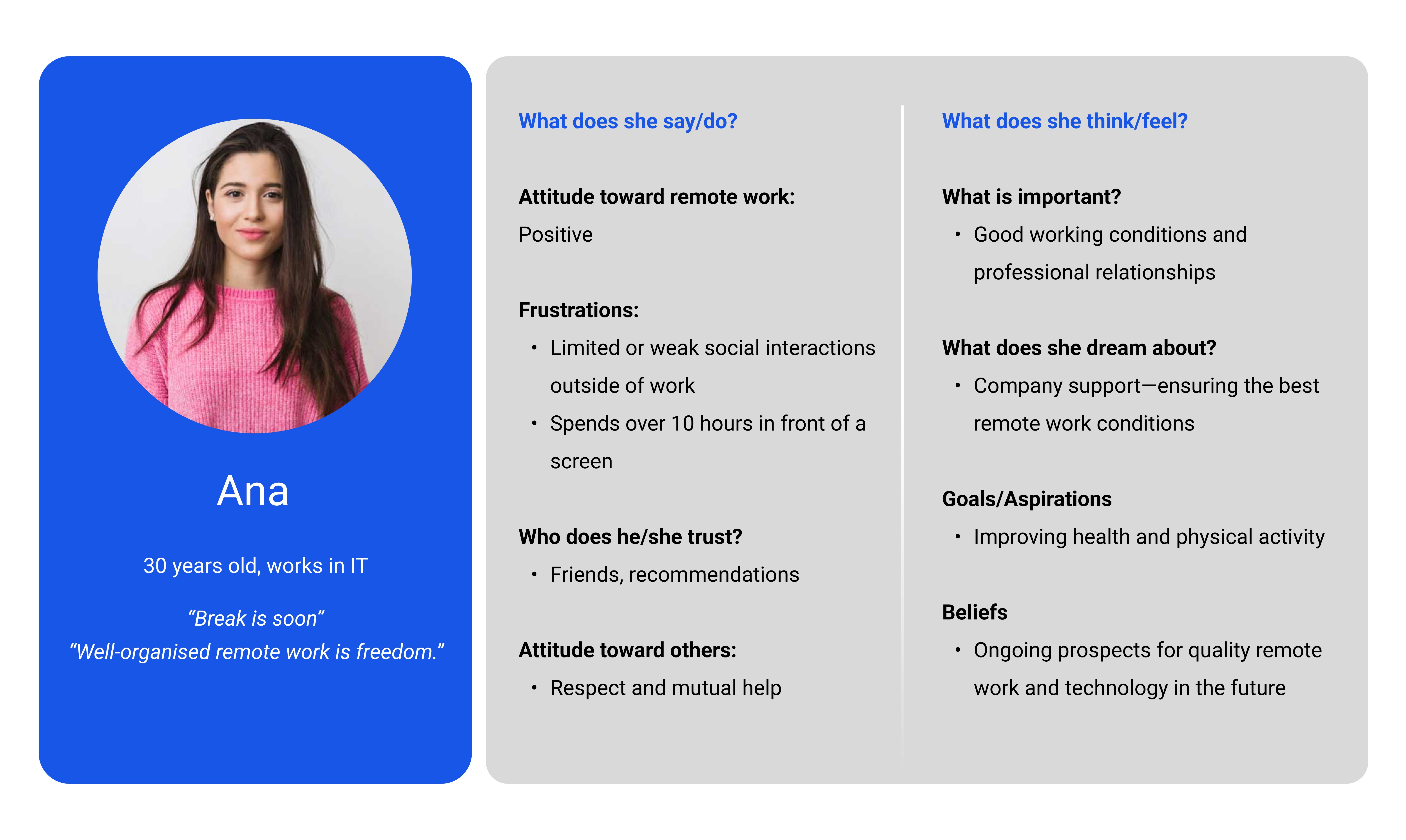
Designing for 'Ana' helped me move beyond generic features to address the specific 'screen-fatigue' of an IT professional. This persona guided my decision to include quiet mode and physical activity prompts, ensuring the app acts as a supportive partner rather than another source of digital stress.
Persona / Empathy map
Comment
Designing for 'Ana' helped me move beyond generic features to address the specific 'screen-fatigue' of an IT professional. This persona guided my decision to include quiet mode and physical activity prompts, ensuring the app acts as a supportive partner rather than another source of digital stress.
How Might We?
Comment
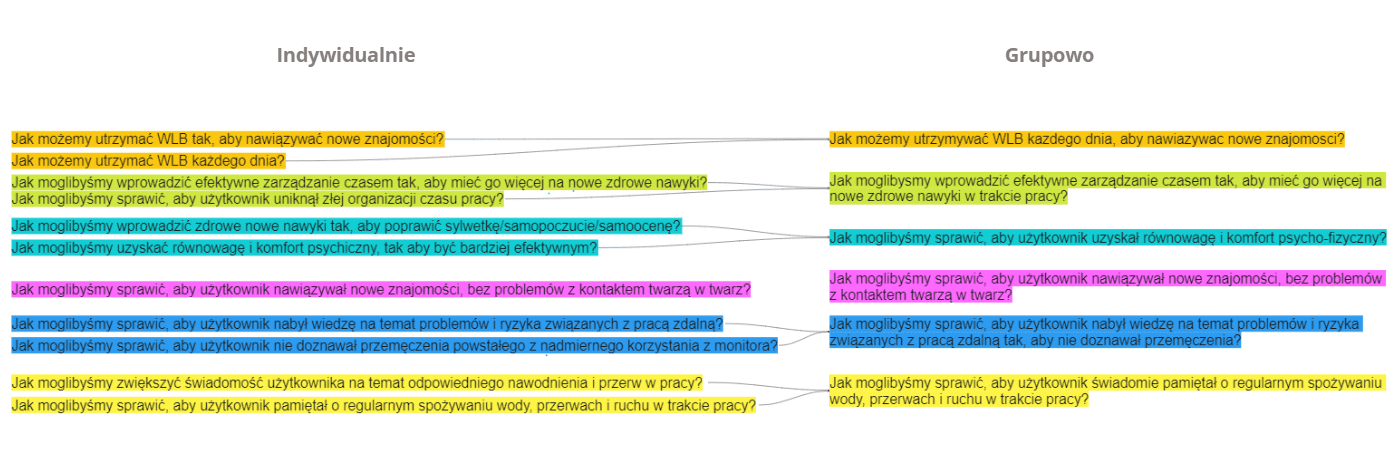
We used the 'How Might We' framework to bridge the gap between individual health and group interaction. This exercise was crucial in deciding to focus on psychophysical comfort, shifting the project’s goal from 'tracking' to 'improving the user's overall quality of life' through actionable habits.
How Might We?
Comment
We used the 'How Might We' framework to bridge the gap between individual health and group interaction. This exercise was crucial in deciding to focus on psychophysical comfort, shifting the project’s goal from 'tracking' to 'improving the user's overall quality of life' through actionable habits.
Value Proposition Canvas
Comment
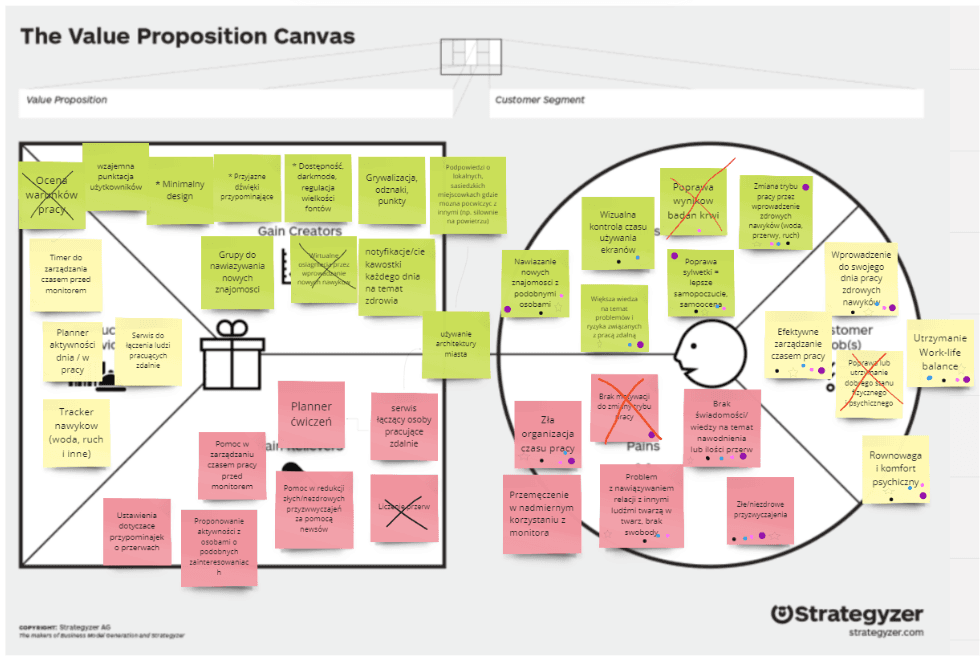
By mapping 'Gain Creators' against 'Customer Pains,' we identified that gamification (points and rewards) was the best way to motivate habit changes. I decided to include a 'ranking' and 'badges' system specifically to provide the dopamine hit that remote workers often miss from office-based recognition.
Value Proposition Canvas
Comment
By mapping 'Gain Creators' against 'Customer Pains,' we identified that gamification (points and rewards) was the best way to motivate habit changes. I decided to include a 'ranking' and 'badges' system specifically to provide the dopamine hit that remote workers often miss from office-based recognition.
Research & Observations
Comment
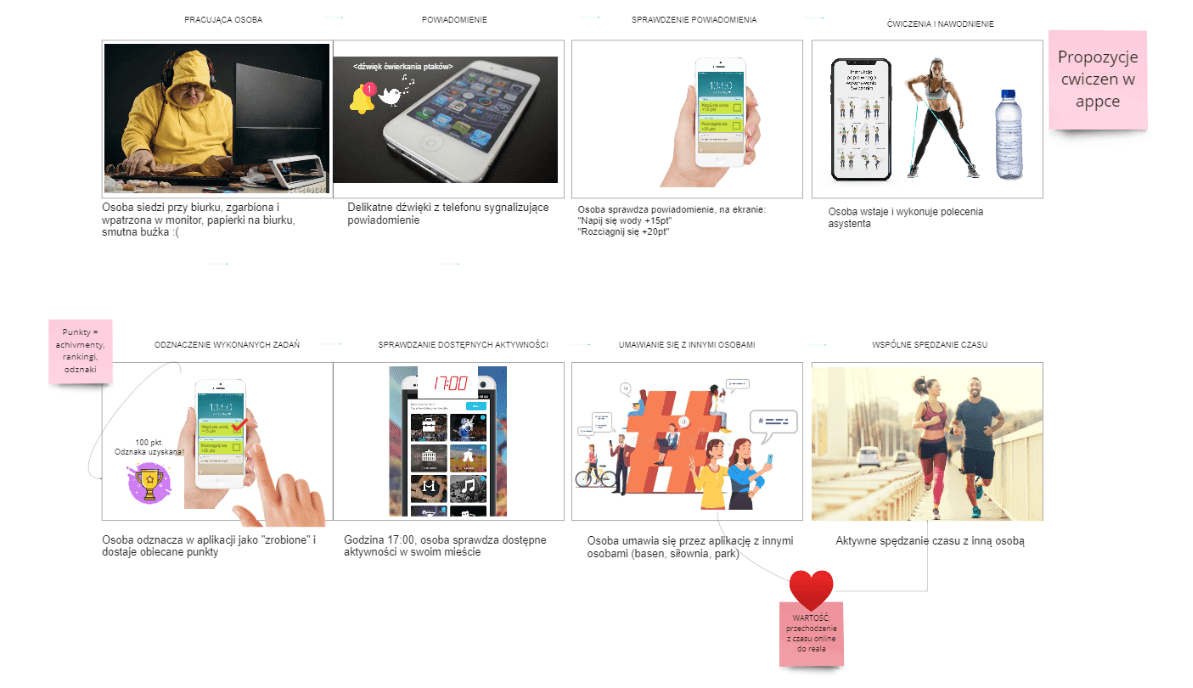
We created this storyboard to visualize the transition from digital notification to physical action. This helped me validate the 'value' of the app—moving the user from a sedentary, isolated state to an active, social one—proving that the app's success is measured by the user's time spent away from the screen.
Research & Observations
Comment
We created this storyboard to visualize the transition from digital notification to physical action. This helped me validate the 'value' of the app—moving the user from a sedentary, isolated state to an active, social one—proving that the app's success is measured by the user's time spent away from the screen.
Our App
Comment
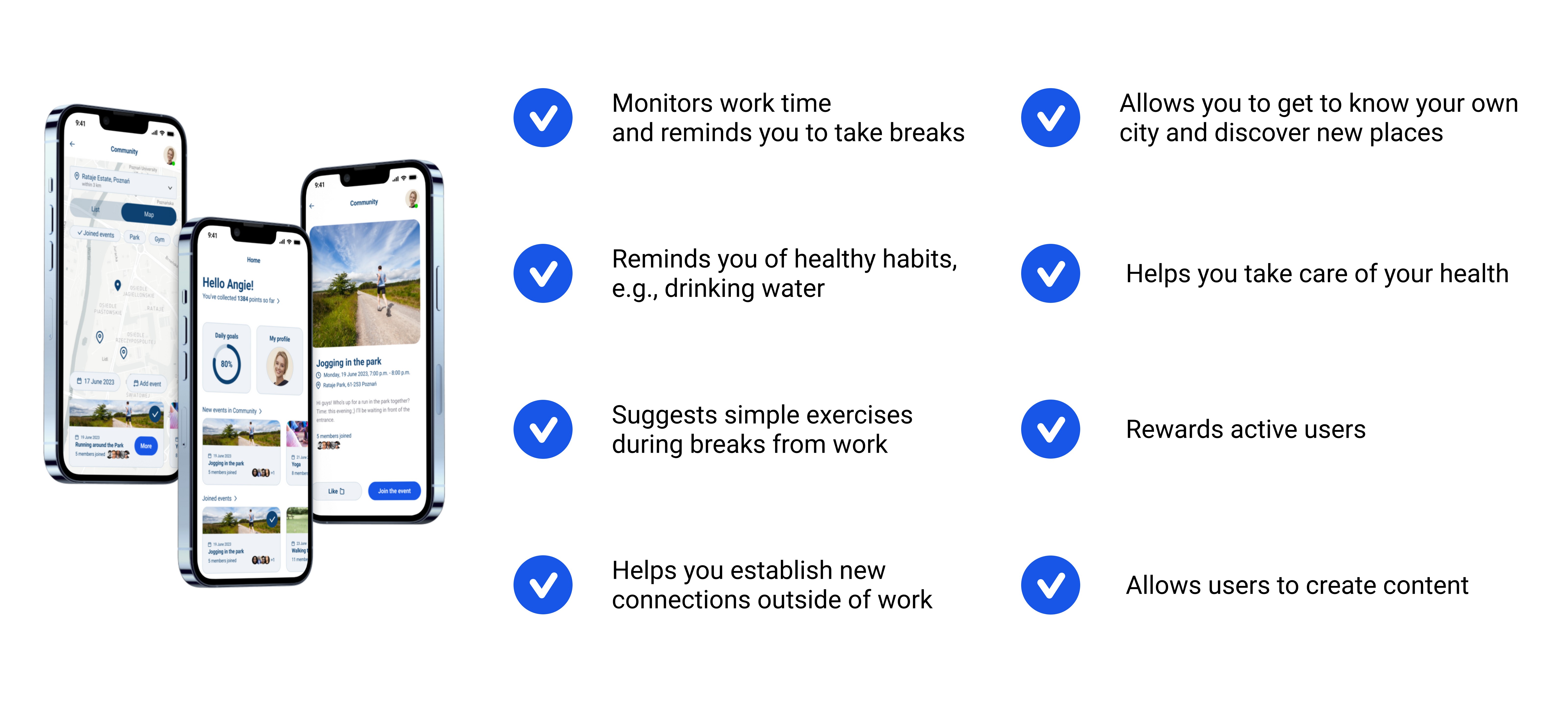
We chose to highlight these six core features because they directly address the 'pains' identified in my initial research. The decision to include city discovery and content creation was made to transform the app from a tool into a community-driven ecosystem.
Our App
Comment
We chose to highlight these six core features because they directly address the 'pains' identified in my initial research. The decision to include city discovery and content creation was made to transform the app from a tool into a community-driven ecosystem.
User Journey Map
User Journey Map
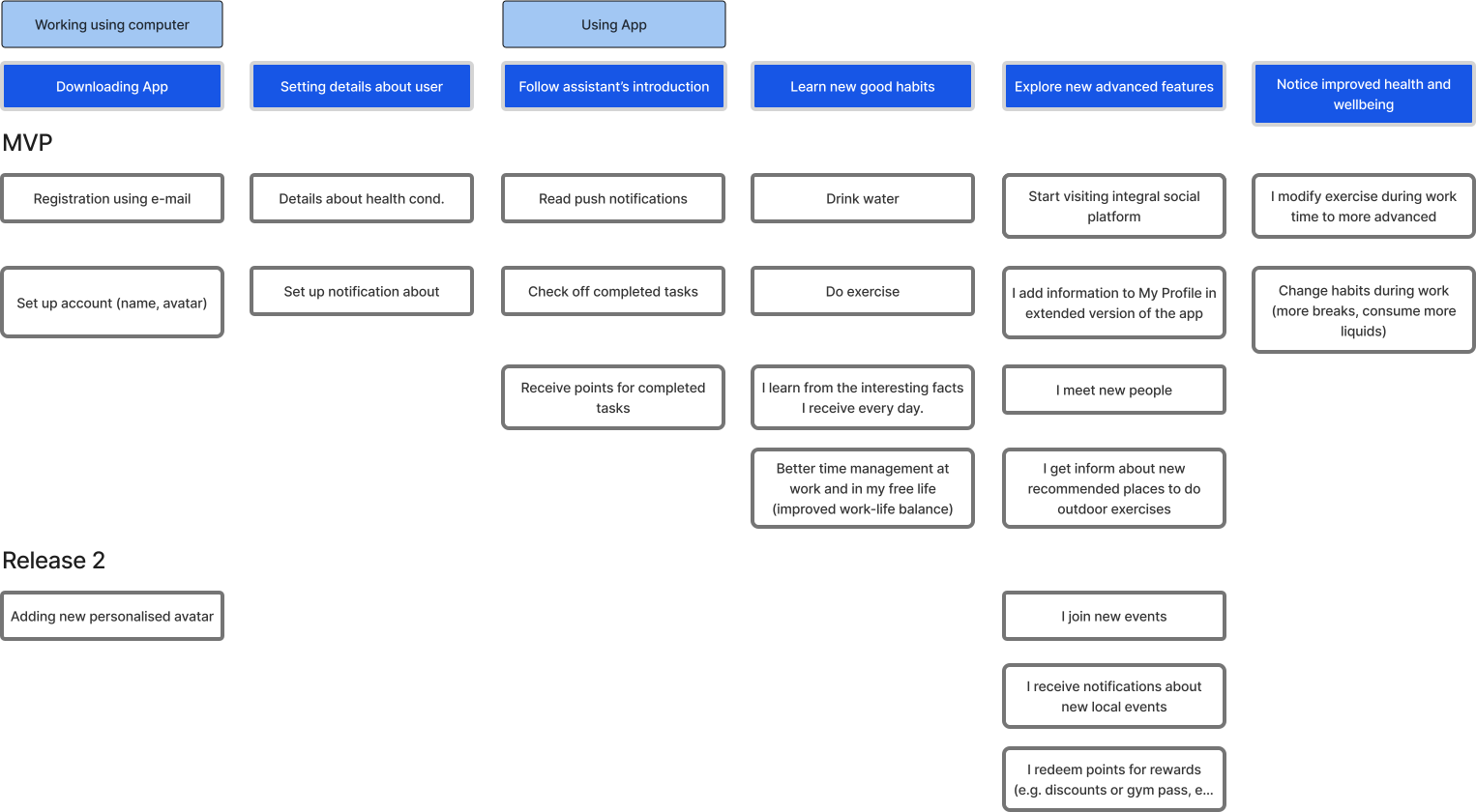
By combining qualitative deep-dive interviews with direct behavioral observations, we uncovered a significant disconnect between remote workers' intentions and their actual habits, such as improper stretching techniques and severe dehydration. These data-driven insights validated the decision to focus on guided physical interventions and automated hydration tracking, directly addressing the 85% of users suffering from headaches and screen fatigue.
Design
Design
Wireframes
Comment
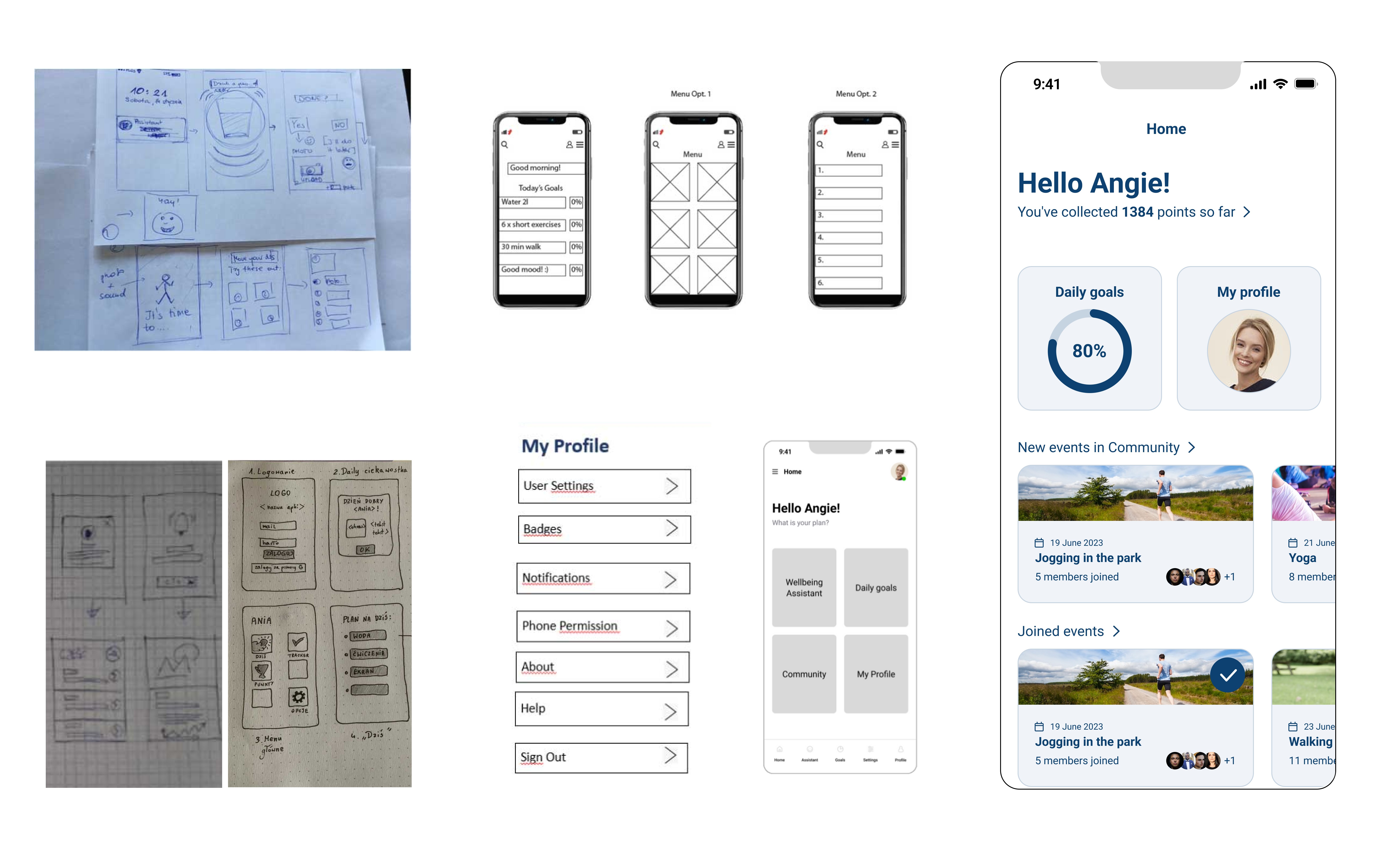
We transitioned from hand-drawn sketches to high-fidelity UI to test the balance between data visualization and whitespace. The final 'Home' screen uses a card-based layout to provide a quick 'snapshot' of progress, making it easy for a busy professional to check their status at a glance during a short break.
Wireframes
Comment
We transitioned from hand-drawn sketches to high-fidelity UI to test the balance between data visualization and whitespace. The final 'Home' screen uses a card-based layout to provide a quick 'snapshot' of progress, making it easy for a busy professional to check their status at a glance during a short break.
Information Architecture
Comment
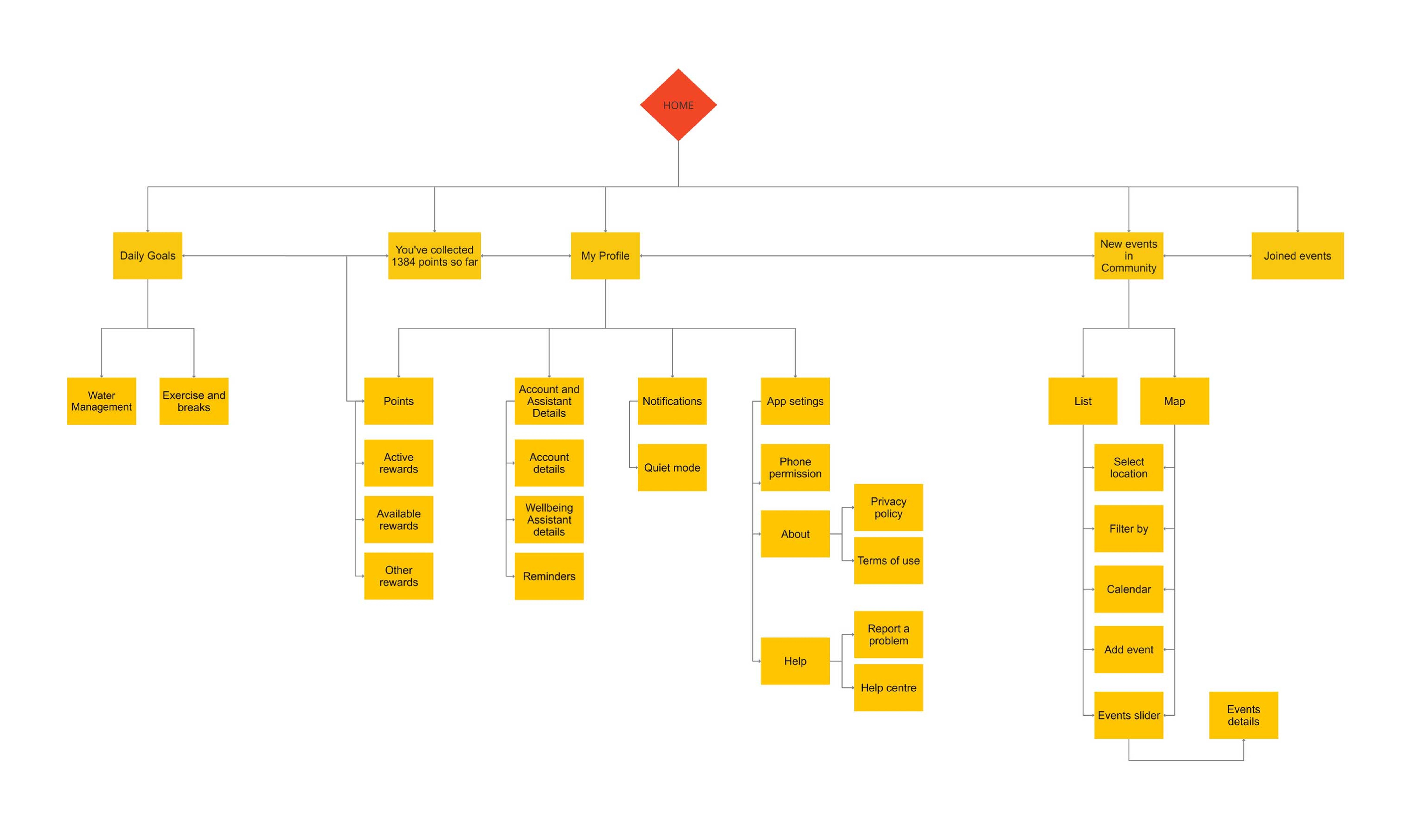
We structured the app’s hierarchy to separate personal wellness tracking from social discovery, ensuring a low cognitive load for the user. By nesting 'App Settings' and 'Account Details' under a single profile tab, I kept the primary navigation focused on the user’s immediate daily goals and community engagement.
Information Architecture
Comment
We structured the app’s hierarchy to separate personal wellness tracking from social discovery, ensuring a low cognitive load for the user. By nesting 'App Settings' and 'Account Details' under a single profile tab, I kept the primary navigation focused on the user’s immediate daily goals and community engagement.
First Usability Tests
First Usability Tests
Comment
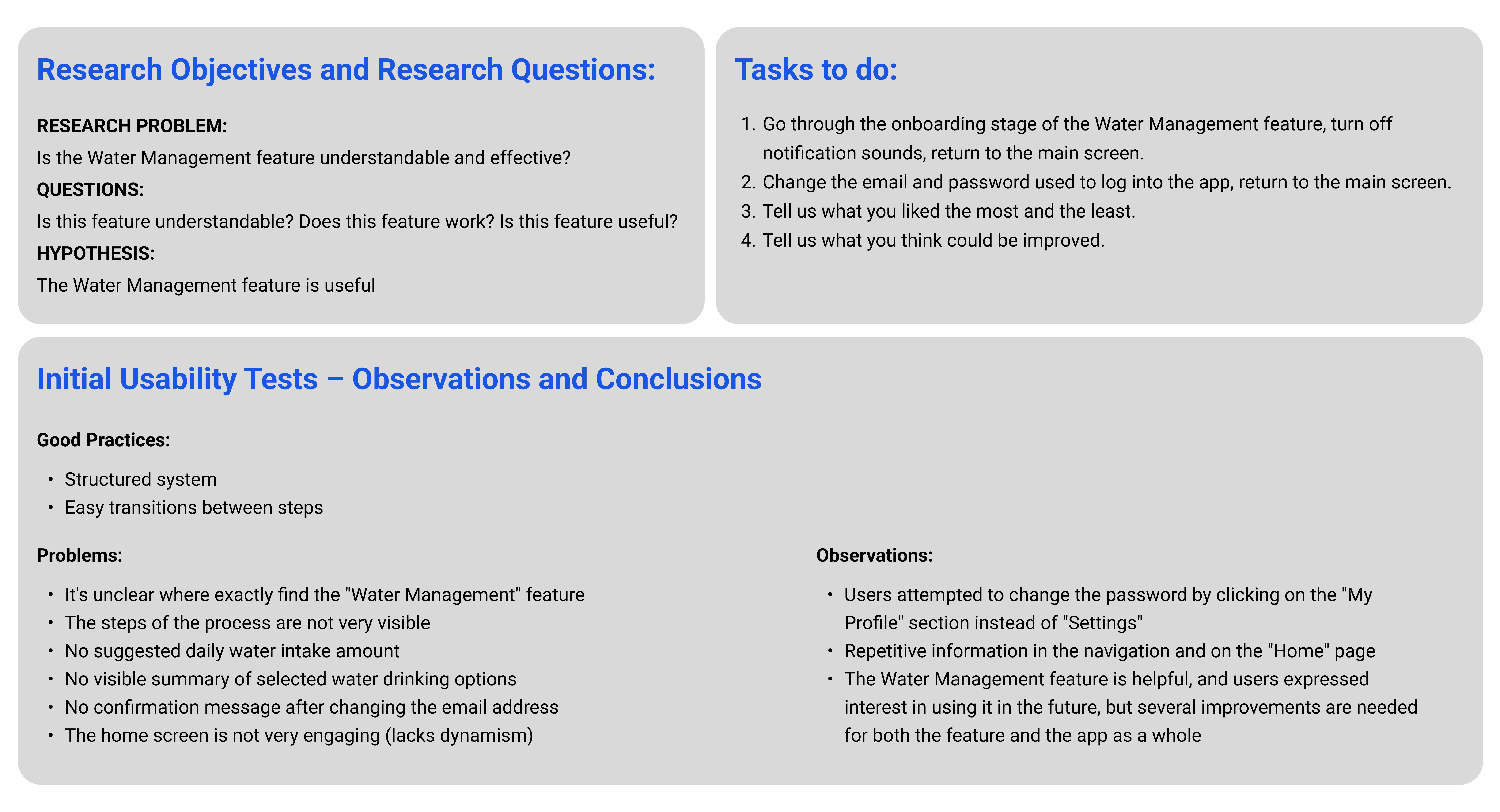
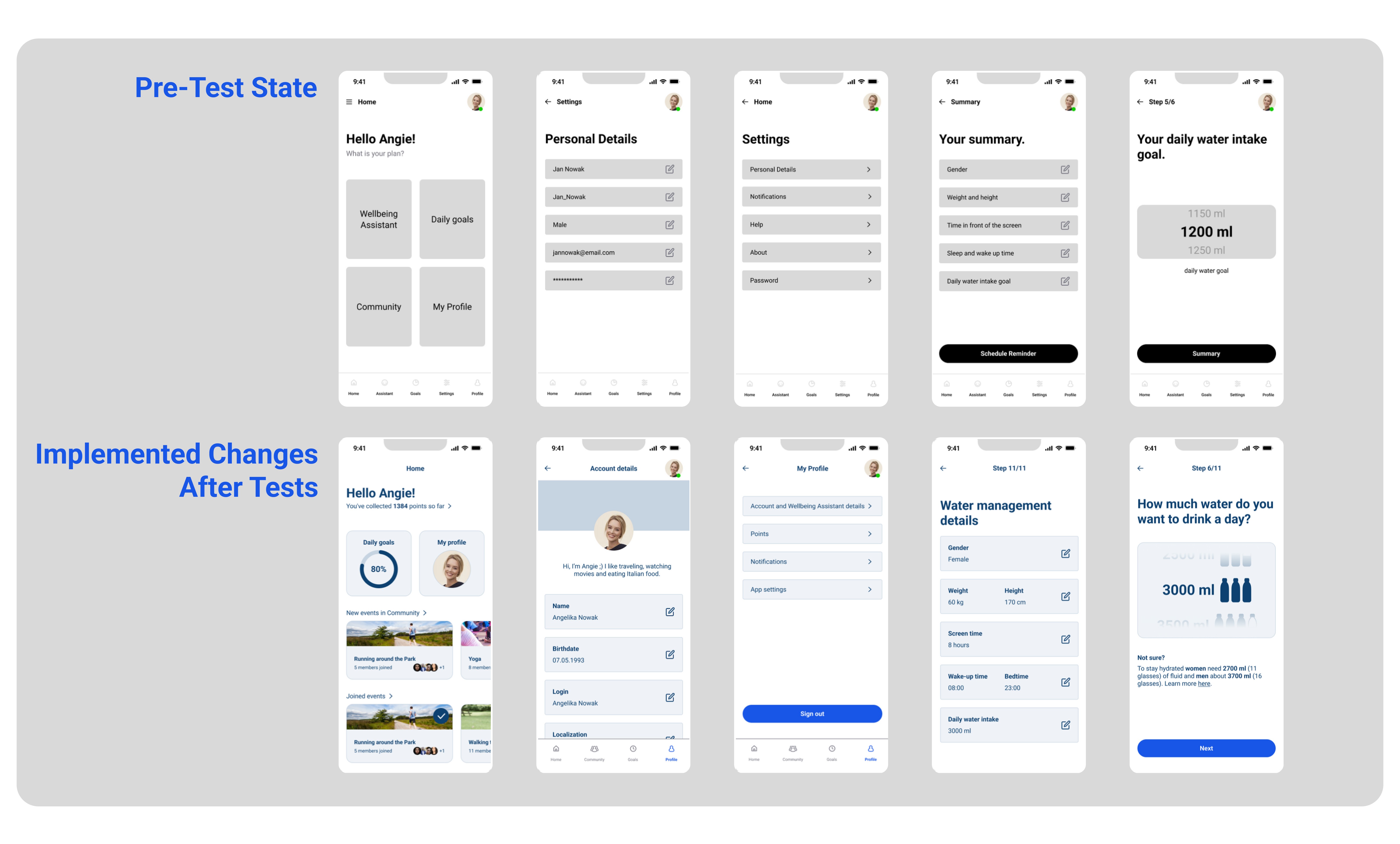
We conducted initial usability testing to identify friction points in the onboarding flow, which revealed that users struggled with navigation and a lack of visual feedback. In response, I redesigned the Home screen for better engagement and simplified the water intake settings, ensuring that critical features like 'Water Management' are now discoverable and the process is visually transparent.
Comment
We conducted initial usability testing to identify friction points in the onboarding flow, which revealed that users struggled with navigation and a lack of visual feedback. In response, I redesigned the Home screen for better engagement and simplified the water intake settings, ensuring that critical features like 'Water Management' are now discoverable and the process is visually transparent.
Implement
Implement
A/B Test
Comment
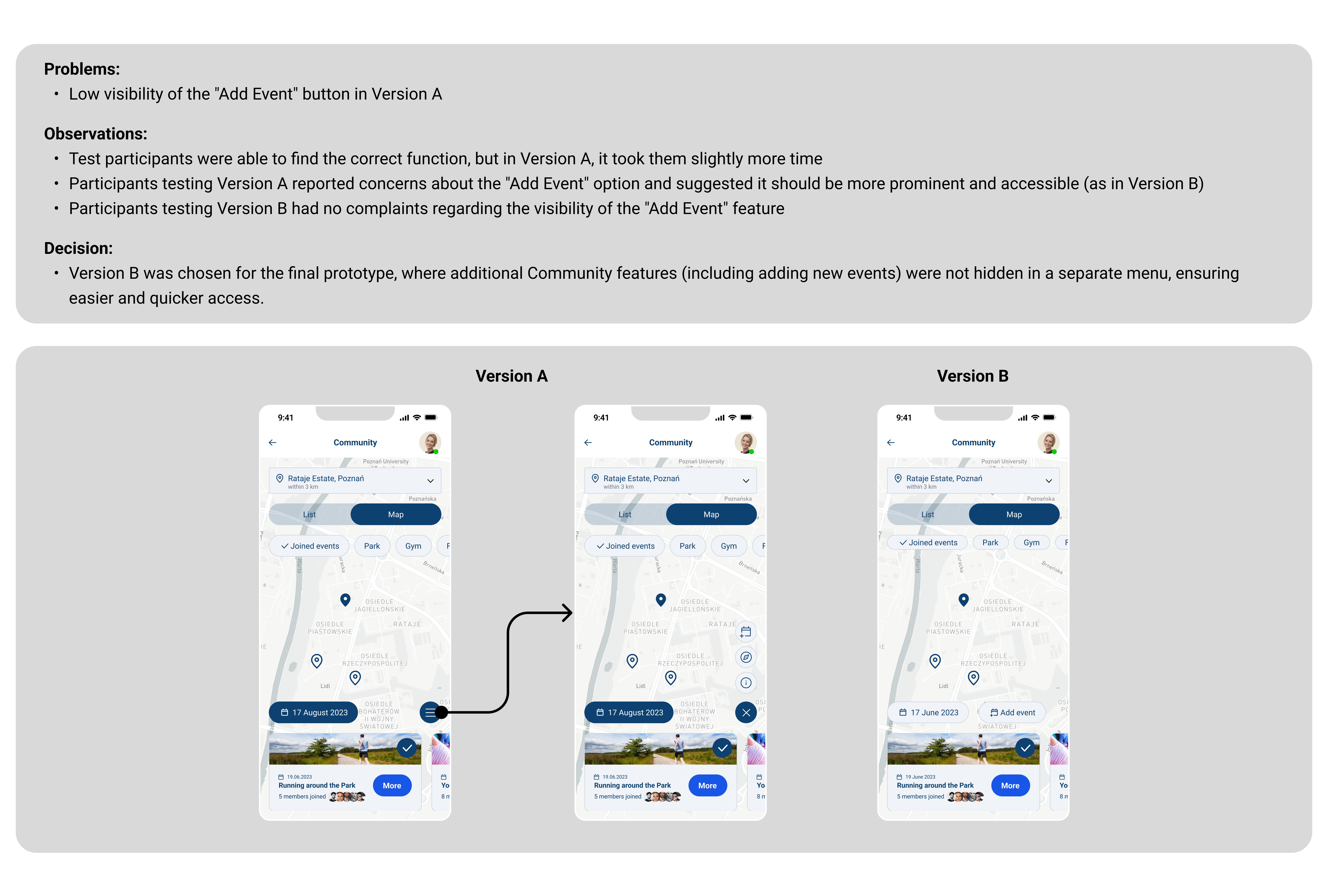
We performed an A/B test to optimize the discoverability of the 'Add Event' function, as the original hidden menu in Version A created unnecessary friction and delayed user action. Based on the performance data and participant feedback, I implemented Version B, moving the core action to the top level to ensure the community-driven aspect of the app is as accessible and seamless as possible.
A/B Test
Comment
We performed an A/B test to optimize the discoverability of the 'Add Event' function, as the original hidden menu in Version A created unnecessary friction and delayed user action. Based on the performance data and participant feedback, I implemented Version B, moving the core action to the top level to ensure the community-driven aspect of the app is as accessible and seamless as possible.
Usability Tests Using HiFi Wireframes
Usability Tests Using HiFi Wireframes
Comment
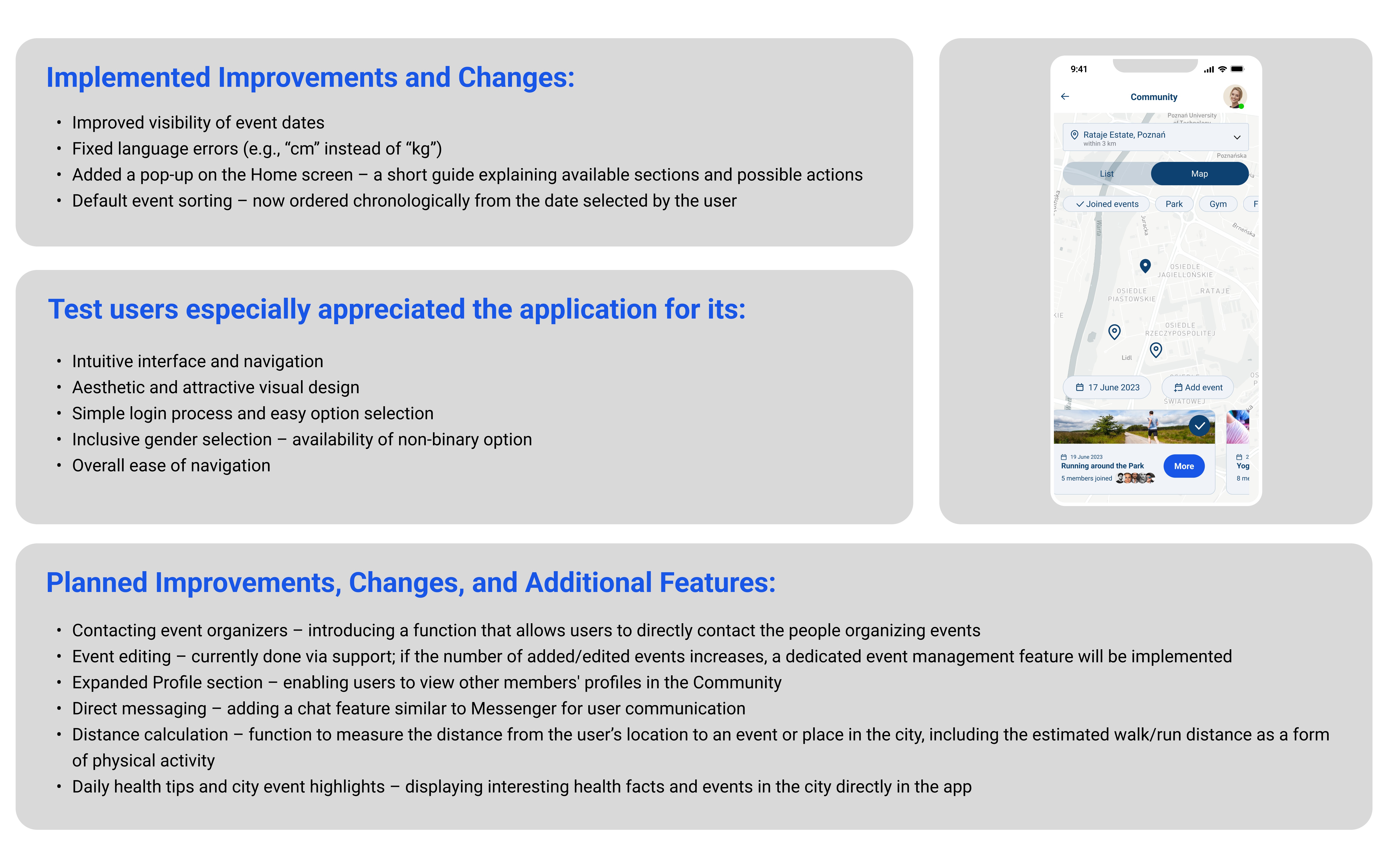
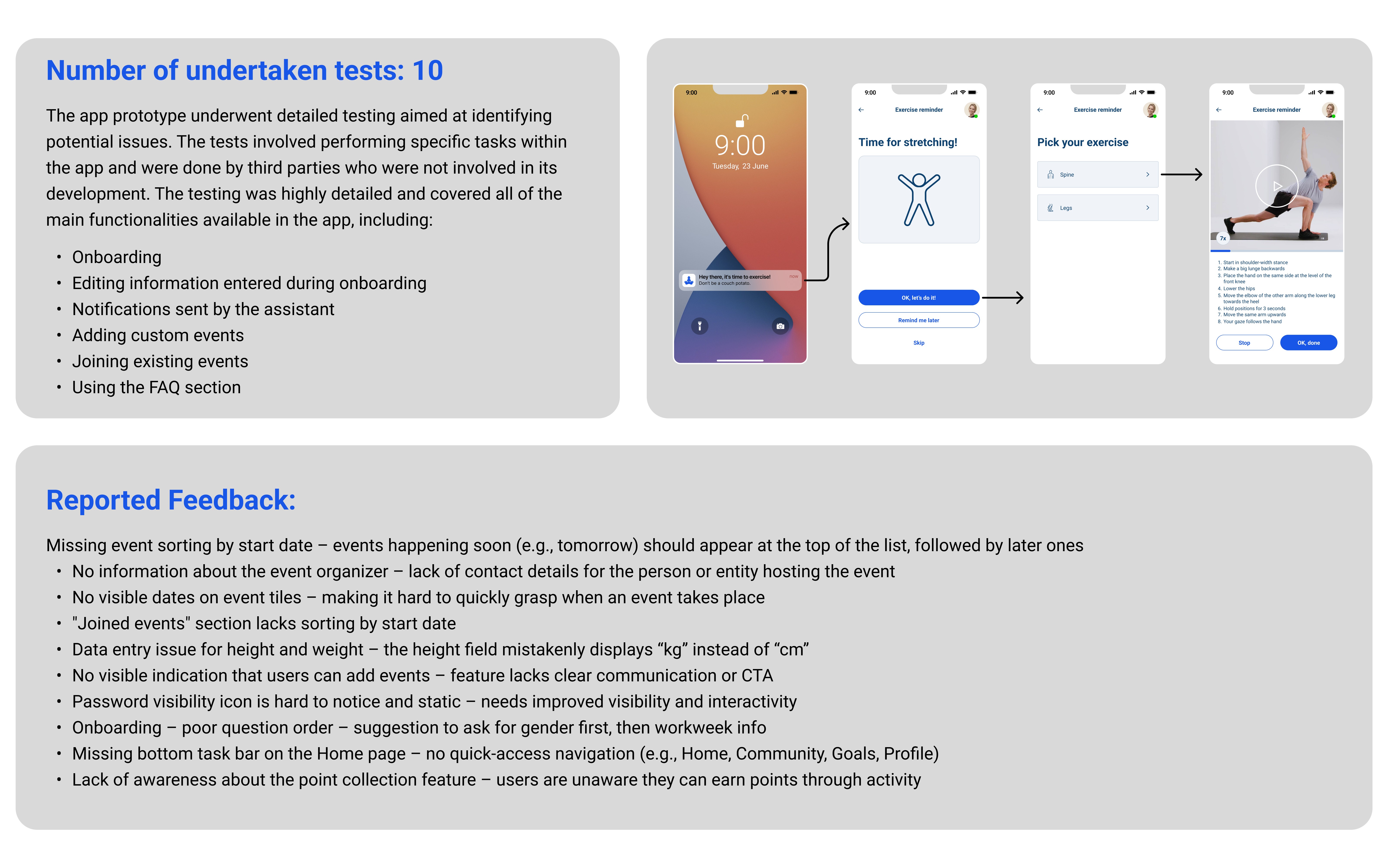
We conducted a series of 10 detailed usability tests with third-party participants to stress-test the high-fidelity prototype across core functions like onboarding and event management. This phase was critical for uncovering nuanced UI issues—such as incorrect data units and poor event visibility—allowing me to implement chronological sorting and enhanced navigation bars that significantly improved the overall user intuition and inclusivity.
Comment
We conducted a series of 10 detailed usability tests with third-party participants to stress-test the high-fidelity prototype across core functions like onboarding and event management. This phase was critical for uncovering nuanced UI issues—such as incorrect data units and poor event visibility—allowing me to implement chronological sorting and enhanced navigation bars that significantly improved the overall user intuition and inclusivity.
User Flows - Points
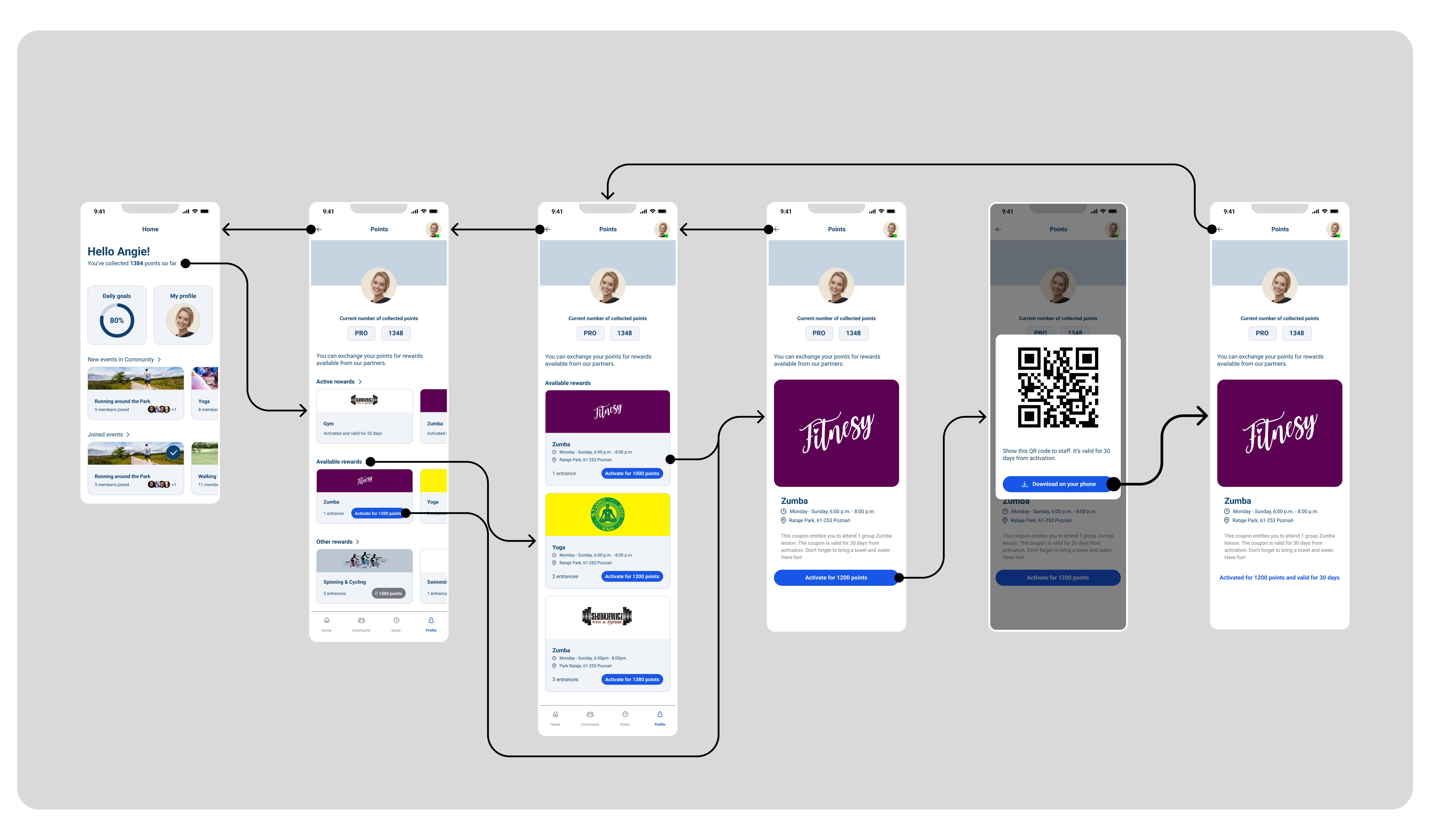
User Flows - Points
User Flow - Push Notifications
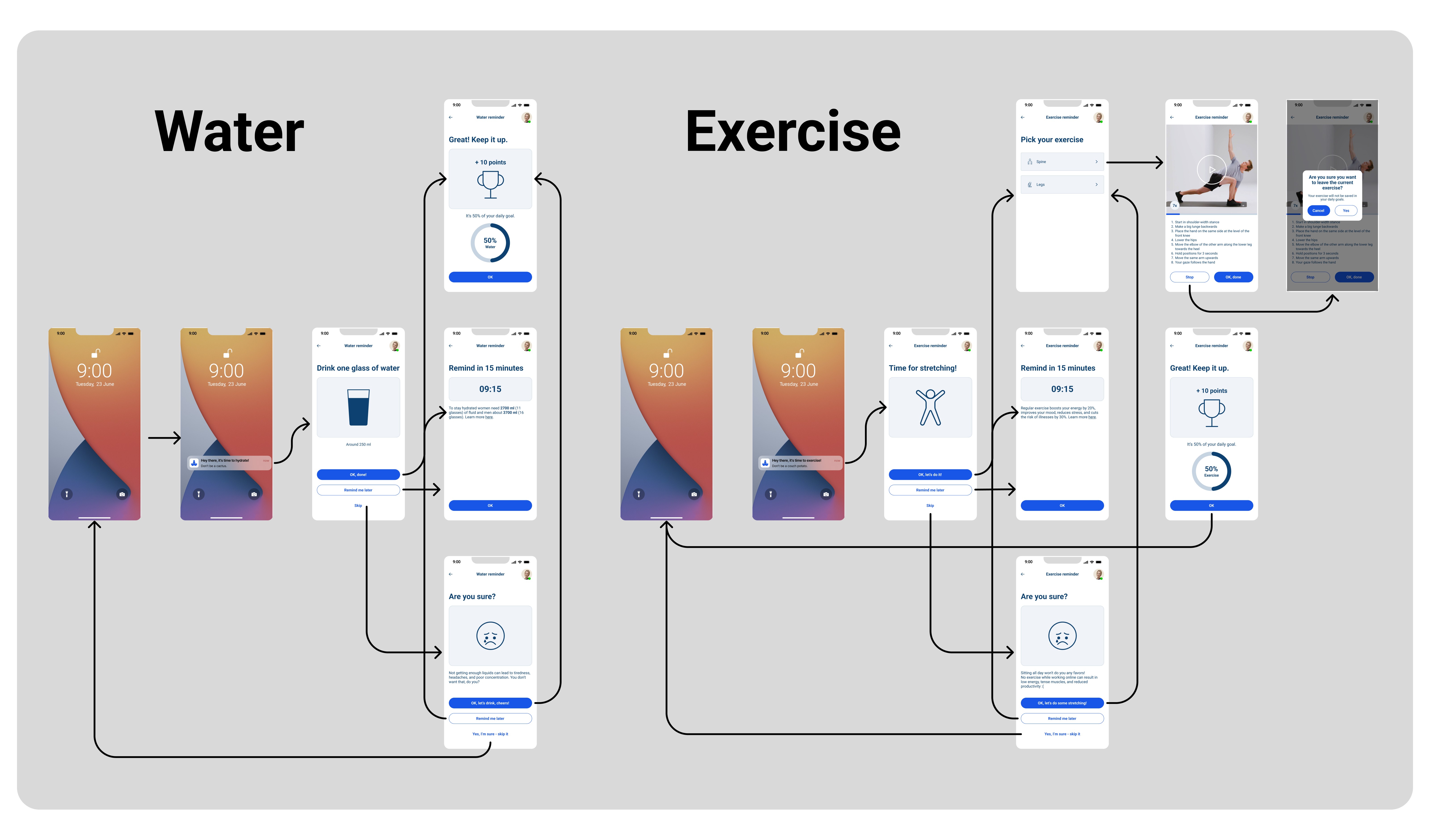
User Flow - Push Notifications
User Flow - Push Notifications
User Flows - Daily Goals
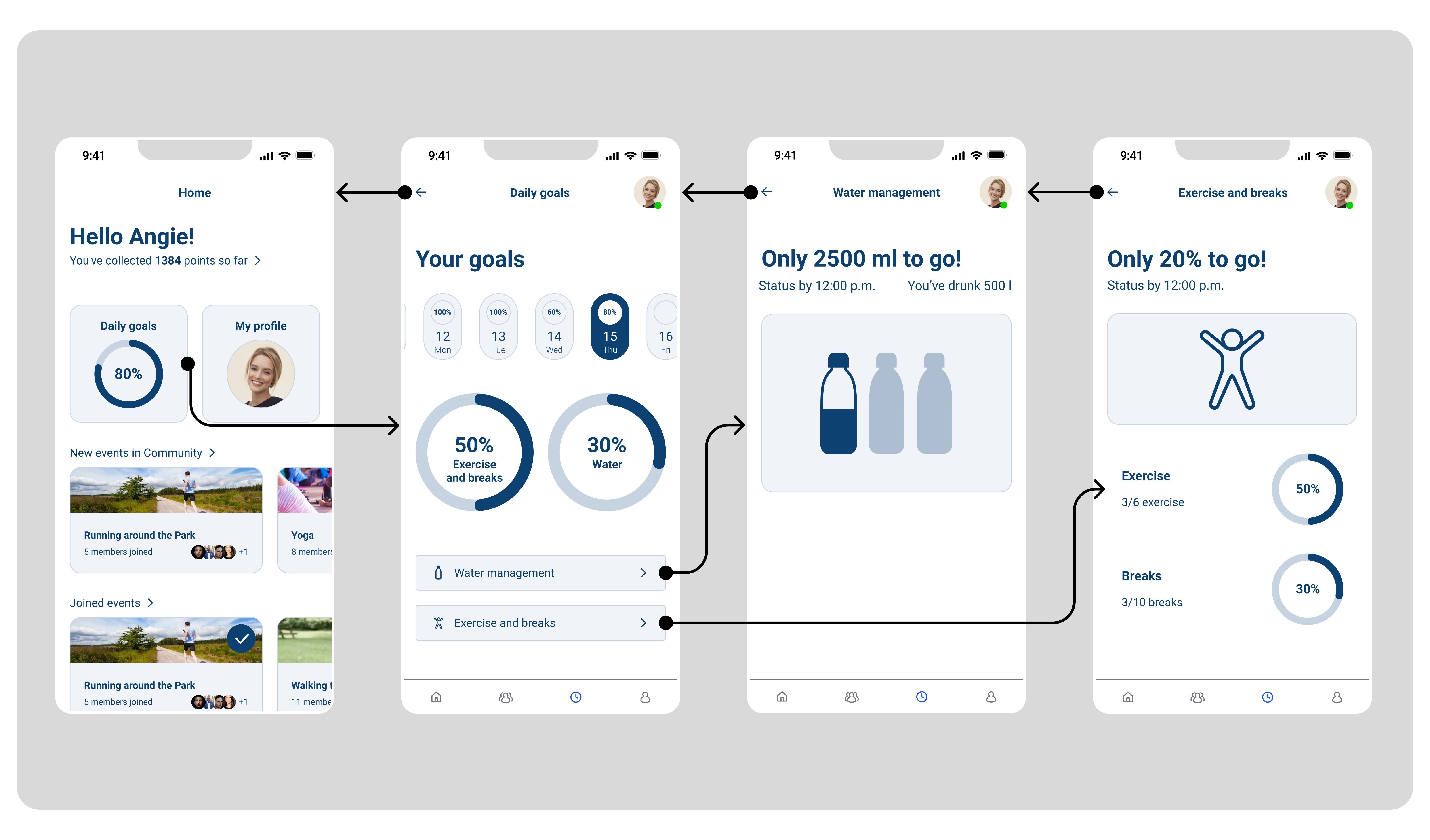
User Flows - Daily Goals
User Flows - Daily Goals
User Flows - Communication
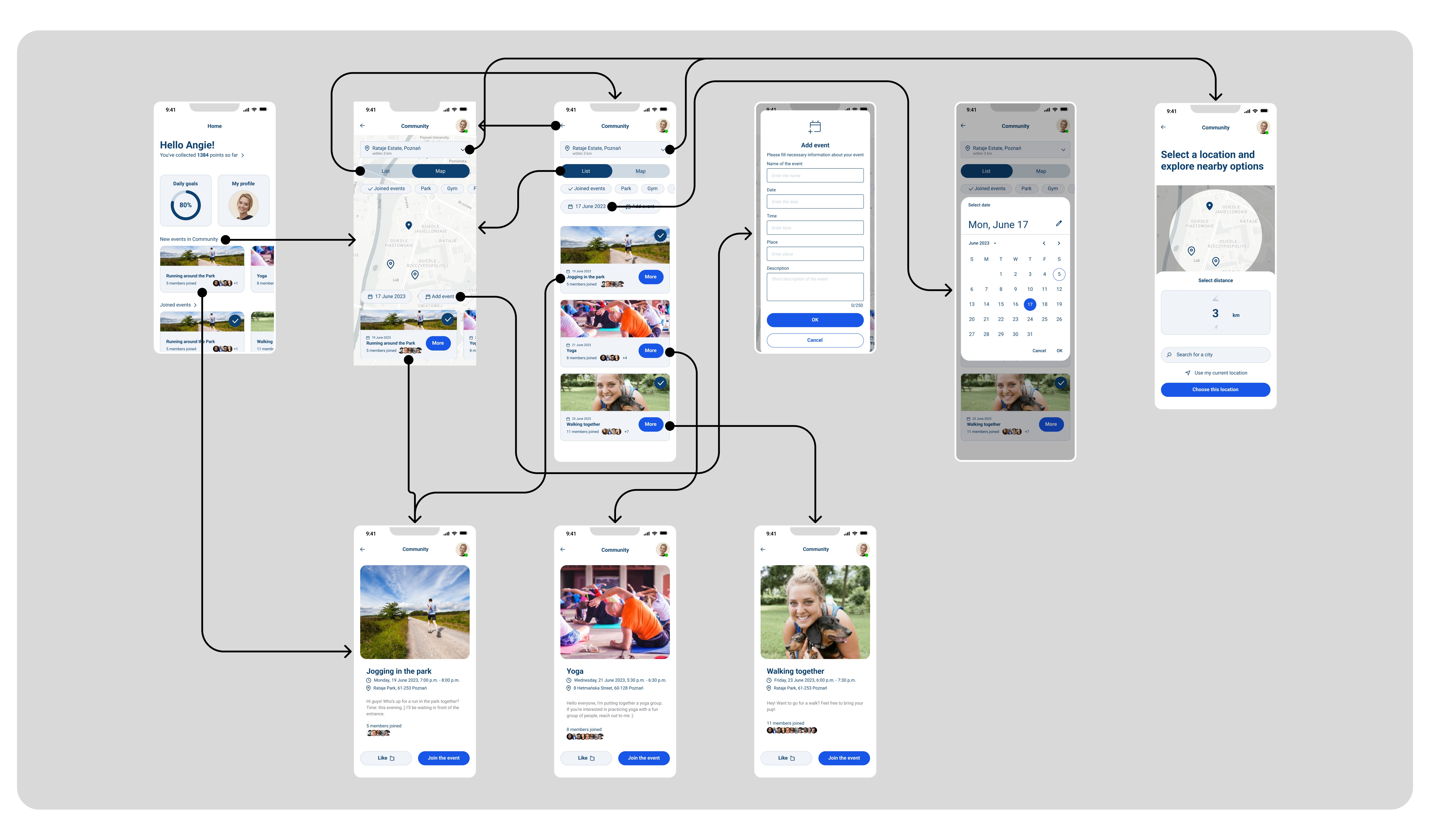
User Flows - Communication
User Flows - Communication